
The three sources
Every deal starts from up to three primary files, plus anything you type yourself:
- Offering memorandum — PDF. The seller’s package.
- T-12 — trailing twelve-month operating statement. Excel is preferred. PDF, CSV, and a photo are accepted.
- Rent roll — current unit list. Excel is preferred. The same broader file types are accepted.
A single PDF that already contains all three can be dropped on the Offering Memorandum slot. QUAKE tries to find the bundled T-12 and rent roll inside it. If a field is missed, set Property Management Software to the system that created the file and upload again.
Offering memorandum
QUAKE uses the memorandum for identity and for the seller’s stated economics: property name and location when they are in the file, unit count, year built, class, asking price, and the seller’s income and NOI figures.
Seller NOI is kept under its own labels, including OM Current and Seller Pro Forma. Seller Pro Forma is unverified. QUAKE does not treat it as QUAKE’s stabilized NOI.
T-12 operating statement
The T-12 is the operating history. QUAKE reads trailing income, operating expenses, and NOI. When a T-3 is in the file, that shorter period is kept beside the T-12 so you can see the difference.
Expenses are grouped into the categories Trailing-12 Analysis uses. QUAKE looks for nine expense categories and compares each line with a class-B reference band, marked HIGH, NORMAL, or LOW. A missing category is listed above Side-by-Side so you can supply it. Those bands are a reference inside the tool, not an audit of the statement.
T-12 NOI used for current operations is labeled T-12 Actual or T-12 Normalized. Debt capacity for current operations uses that T-12 NOI, not a rent-roll income figure.
Rent roll
The rent roll is the current building. QUAKE reads total units, occupied units, vacant units, in-place rent, and market rent when the file has it.
Physical occupancy is occupied units divided by total units. Rent-roll income is contract rent. It is not a standalone NOI, and it is not used by itself to size a loan.
Other documents
Open Documents and use Add Documents for supporting files. Those files are stored with this deal. They do not replace the three primary slots, and QUAKE does not run the same extraction on them. The original memorandum, T-12, and rent roll stay in their own rows. You can view a file while it is still on this device, and you can remove an added document.
How QUAKE reconciles the documents
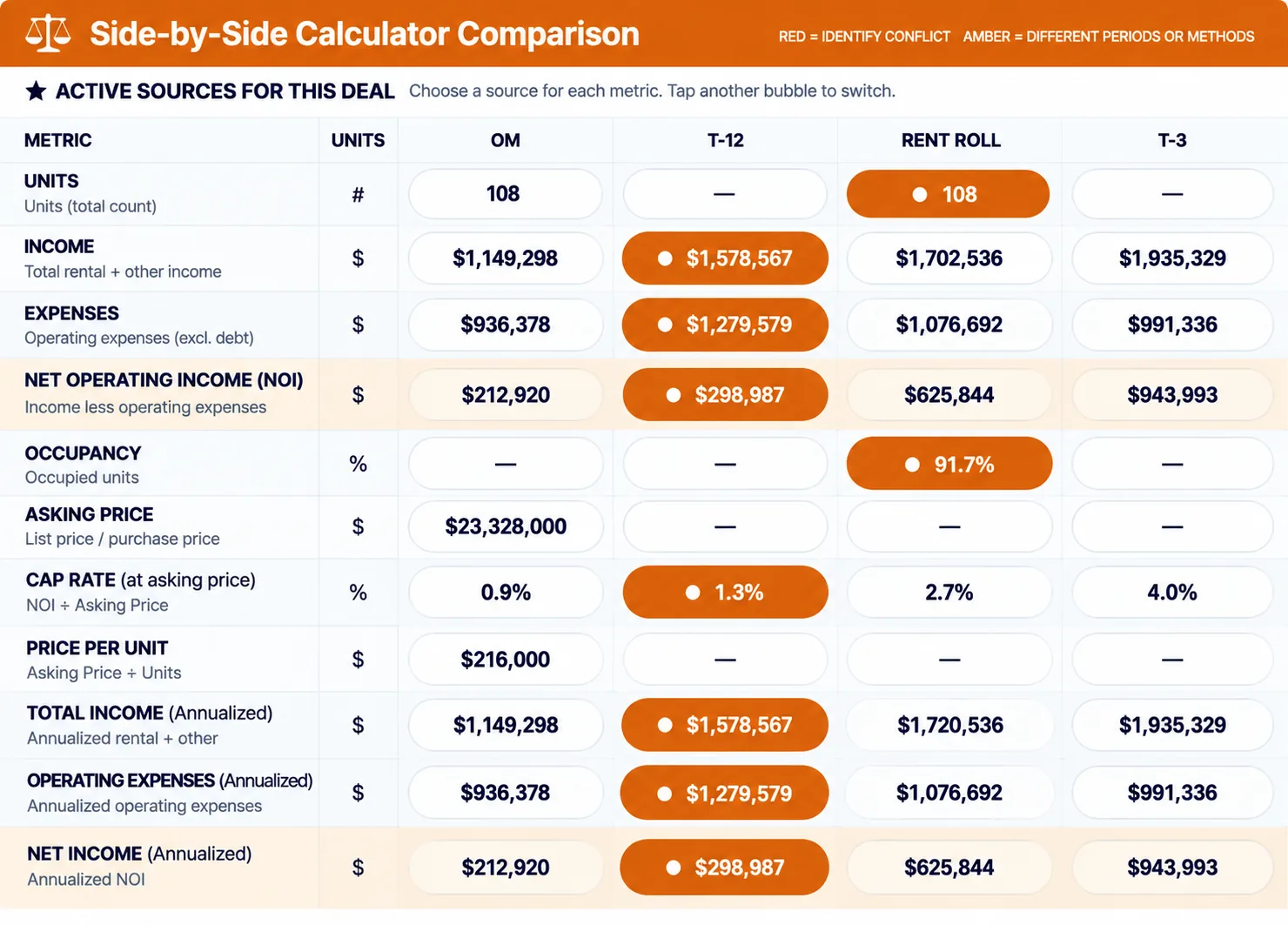
Side-by-Side places the offering memorandum, the T-12, and the rent roll in separate columns. The Deal Index is the working set of numbers the later tools read. Where a pencil is available, you choose which document’s figure drives that line.
QUAKE does not blend the columns into an average. A gap between T-12 income and rent-roll income stays a gap. Different time periods are not treated as the same measurement.
Occupancy and vacancy
- Physical occupancy comes from the rent roll: occupied units divided by total units. Vacant units are the remainder.
- Economic occupancy is discussed in Rent Roll Analysis against the T-12. It is not the same as the physical unit count.
- Loss-to-lease compares in-place rent with market rent when both are on the rent roll.
- If the rent roll has no unit count, QUAKE cannot compute physical occupancy. The Pro Forma shows that gap instead of inventing a percentage.
Lease-up and absorption can come from the documents, from a calculation, or from a number you type. A typed absorption rate is marked user-entered. An assumed rate is marked as an assumption, not as something found in a file.
How financial information is categorized
Keep these labels separate when you read a result:
- T-12 Actual or T-12 Normalized — trailing operations from the statement.
- T-3 Annualized — the shorter period, when the file has one.
- Rent Roll Run-Rate — contract rent from the current roll, not an NOI.
- OM Current and Seller Pro Forma — unverified — the seller’s figures.
- Quake Stabilized — QUAKE’s calculated stabilized NOI. It is not the seller’s pro forma and it is not the T-12.
- Hybrid Run-Rate NOI — a scenario only: rent-roll income minus the T-12 operating expenses you selected. It is not going-in NOI.
When information is missing or inconsistent
A missing expense category is listed so you can add it. A document that has not been uploaded leaves that column empty. If only one file is uploaded, QUAKE can still show that file, and it tells you that a cross-check is not possible until the other documents are there.
If two sources disagree, both figures remain. Analyze the Deal and the variance lines call out income and NOI differences. They do not silently pick a winner.
If an analysis cannot run, the section says what is missing. Fix that item and open the section again. Opening Deal Highlights again rebuilds the highlights from the Deal Index as it stands then.
Source data, assumptions, and calculations
- Source data is read from a document or typed in the Manual column. In the Pro Forma and in Excel Underwriting, source-style figures are the ones that came from the deal, not the ones you are testing.
- Assumptions are marked ASSUMPTION. In the Pro Forma they include purchase price, loan-to-value, interest rate, amortization, rent growth, expense growth, exit year, exit cap, selling costs, and an optional selling price. You can change them. They are not claims from the T-12.
- Calculations are results QUAKE computes from the sources and assumptions you have, such as physical occupancy, a cap rate on a chosen NOI, Quake Stabilized NOI, DSCR, and the yearly Pro Forma.
In Excel Underwriting the same split is color-coded: orange cells are assumptions you can edit, blue cells come from the saved deal, and green cells are formulas. Do not type over the green cells.
What to review before you rely on the analysis
- Open each original with View Document and confirm the file is the one you meant to upload.
- Check property name, city, unit count, and asking price against the memorandum.
- Check T-12 income, expenses, and NOI against the statement, including any category the missing-categories strip still lists.
- Check occupied units, vacant units, and in-place rent against the rent roll.
- Read Side-by-Side for lines that do not match. Decide which source the Deal Index should use.
- Only then run the analyses or create a report.
For how those checked numbers move through each tool, continue to Understanding QUAKE's Analysis.